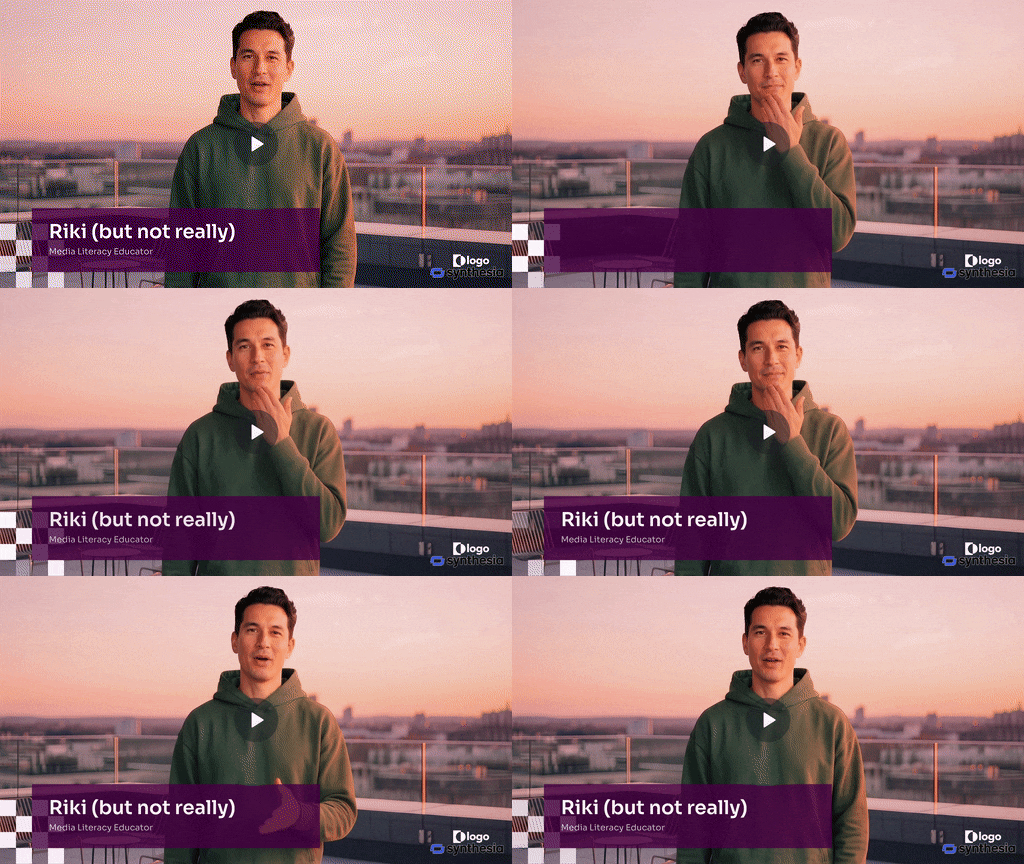
I’ve been playing around with the AI video generator Synthesia, and it’s pretty impressive. Designed for business applications, Synthesia offers a fairly easy-to-use interface that anyone who has used Powerpoint or Google Slides should understand. It offers a variety of pre-designed avatars of various ages, races, and body types as well as a number of corporate-friendly backdrops.
Here’s a test of the AI tool featuring a number of different scenes, which use Google’s Neo video generator.
What do you think? Impressed? Horrified? Something in between?
Fun experiment! If you’re testing AI video generators, HappyHorse AI Video is another one worth trying alongside Synthesia — it’s more focused on cinematic/short-form generation (text-to-video and image-to-video) rather than presenter-style videos. Free to try with no watermark. Would be curious how you’d compare the output styles.
Phim Heo HD, Xem Phim Heo Gái Bướm Múp Không Che Hay Nhất
Interesting test setup. What stood out to me in testing AI video tools is how much the results vary based on prompt specificity — broad prompts tend to produce generic output, while very detailed prompts can hit surprisingly high quality. Did you notice any correlation between prompt length and output consistency in your tests?
Fried cinnamon roll doughnuts are genius! What a creative way to enjoy cinnamon roll flavors without the long baking time. The glaze on top looks perfect too. I bet these would be amazing with a cup of coffee on a lazy weekend morning. Definitely adding this to my weekend baking list!
I have been experimenting with AI image tools for my dance photography blog and the results are quite impressive. The quality of AI-generated images has improved dramatically in the last year. For anyone working with visual content, these tools are becoming hard to ignore. Would love to see more comparisons of different AI tools!
Great experiment! AI video generation has come a long way from the early days of choppy, uncanny results. I’ve been testing several tools lately and the quality gap between Synthesia’s presenter-style output and newer cinematic generators is narrowing fast. VidGlory is one I’ve found particularly good for short-form content creation. Would love to see you do a follow-up comparing output quality across different prompt styles — your testing methodology is solid!
This kind of hands-on test is much more useful than just listing tools. AI video quality changes quickly, but prompt control, consistency, and how fast you can iterate are still the parts that decide whether a tool is actually usable.
The testing notes here are useful because AI video tools can look similar in demos but feel very different when you try to make several clips in a row. I usually compare prompt control, image-to-video quality, and how quickly a tool lets you retry ideas.
The most useful AI video tests for me are the ones that compare motion quality and how reliably a model follows scene instructions. A generator can look great in one demo, but repeated prompt tests usually show the real strengths and limits.
Ran a similar test recently and hit the same wall with hands and object permanence between cuts. Interesting that yours held up better on the wide shots — makes me think framing choice matters more than model choice at this point.
The framing point in the comment above is a good catch. I’ve noticed the same thing testing a few generators, wide shots hide a lot of the small consistency errors that close-ups make obvious. Hands and object permanence between cuts still seem to be the hardest thing for any of these models to nail consistently.
Interesting test — the temporal flicker in the background elements is the tell for me too. It’s gotten a lot better over the past year but still shows up in anything with fine texture like grass or water. Would be interesting to see the same prompt run again in six months.
Somewhere between impressed and horrified is about right — the individual scenes look genuinely polished, but stitched together the continuity between shots still gives it away. It’s a good reminder that these tools are further along on single-clip quality than they are on multi-shot consistency, which is usually the harder problem to solve.
This AI video test was useful to read. I have also been comparing browser-based text-to-video tools for quick concept clips, and VO3 AI is one of the options that makes it easy to try prompts without a heavy setup.
I came back to this test because AI video tools are changing so fast. For quick prompt-to-video comparisons, Hailuo AI Video Generator is another web tool that is worth checking alongside Synthesia-style workflows.
The Synthesia example is a useful benchmark for how polished AI video can feel. I have also been comparing Kling AI 3.0 Video Generator for shorter text-to-video and image-to-video tests, especially when experimenting with different visual styles.
The avatar lip-sync is what stands out to me watching this — that’s usually the tell for synthetic video even when the voice itself sounds natural. Curious if you tried the multilingual dubbing feature, that’s where a lot of these tools still fall apart.
Nice hands-on test. I’ve been poking around with a few AI tools myself lately, and the presenter-style output always feels more polished than the raw cinematic generators, though the gap is closing. Another option worth throwing into the mix is DeepAI — it covers video plus image and music generation in one place, so it’s handy if you want to compare workflows side by side. Curious whether you found any key differences in how consistent the avatars stayed across multiple takes?
What I found useful here is that the topic is explained in a fairly straightforward way. People usually want to know the basics before spending time exploring a new platform. If 51club games is something someone is considering, checking the rules, available features, and account information beforehand seems like a sensible approach. A little research can make the overall experience much easier to understand.
Useful roundup. For my own testing notes I also compare browser-based AI video tools such as VO3 AI, especially for quick text-to-video experiments and short marketing clips.
Presenter-style and generative video tools solve different jobs, so the comparison needs a fixed scenario. I would score instruction adherence, lip sync, text accuracy, accessibility, editability, generation time, and cost per accepted scene. Showing failed takes and manual corrections would make the test more useful than a highlight reel alone.
Your hands-on test of Synthesia is a refreshing change from the usual tool roundups—especially the honest take on prompt control and consistency. As someone who works in wellness retail, I’ve seen how much the quality of presentation matters, whether it’s a video demo or product photos. For our customers—mostly adults over 40 dealing with joint stiffness—we rely on clear, trustworthy visuals to show how our magnetic copper bracelets look and feel in daily wear. It’s interesting to see how AI tools like this could streamline that kind of content, but I agree that nothing beats real-world testing for authenticity. If you’re curious how we blend classic craftsmanship with modern marketing, feel free to check out our collection at MagnetPure. Curious what you think of using AI for product-focused videos versus lifestyle shots—any preferences from your tests so far?
Useful overview. I have also been testing Jev for typed AI API experiments; the idea of keeping model outputs structured and easier to validate fits well with this kind of AI workflow.
This page shares a hands-on test of the AI video generator Synthesia, walking through its presenter-style avatars and corporate backdrops, and asks readers whether the results impress or horrify them. It’s aimed at people curious about practical, everyday uses of AI video tools.
If you enjoy quick, one-off AI video experiments, there’s a fun trend worth trying: burning-bridgesai.com turns a single clear photo of you into a short 16:9 clip set in a chandelier party scene, with optional friend photos for the crowd. No prompt or editing app needed, and it takes about ten minutes. It runs on one-time credit packs rather than a subscription, and failed videos are refunded in credits. The download is silent, so you add your own audio in TikTok or Instagram. Given your interest in testing these tools, it could be a lighthearted follow-up to your Synthesia experiment.